Vibe: A Framework for Agentic Software Delivery
February 22, 2026
Overview
Vibe is an agentic software delivery framework. It gives AI coding assistants a structured way to plan, execute, and verify work inside any repository. Instead of typing instructions into a terminal and hoping the agent figures out the right sequence of steps, Vibe provides a set of skills that define the entire workflow from goal to shipped code.
The framework currently works with Claude Code and Codex, and the adapter system is built to expand to other AI coding CLIs over time. It installs into a repository as a set of markdown files, templates, and configurations. Everything is transparent, version controlled, and stored in a .vibe/ directory alongside the codebase.
There is also a visual dashboard that lets developers plan builds, watch execution in real time, and manage tasks without touching the command line at all.
You can jump straight to the repository here.
Why Vibe Exists
AI coding assistants have gotten very good at writing code. The problem is that writing code is only one part of shipping software. Planning what to build, breaking work into tasks, verifying that nothing broke, and documenting what shipped are all still manual processes that most developers handle ad hoc or skip entirely.
Sprints and ticket systems were designed for human teams coordinating over weeks. When an agent can go from a goal description to working code in a few hours, those systems add overhead without adding value. Vibe replaces that cycle with an outcome driven model where every piece of work starts with a defined goal and ends with verified results.
The framework is opinionated on purpose. It has a defined process for every type of task, it enforces planning before execution, and it uses permanent safety contracts called Guards to protect core behavior across every build.
Plan-First Delivery Loop
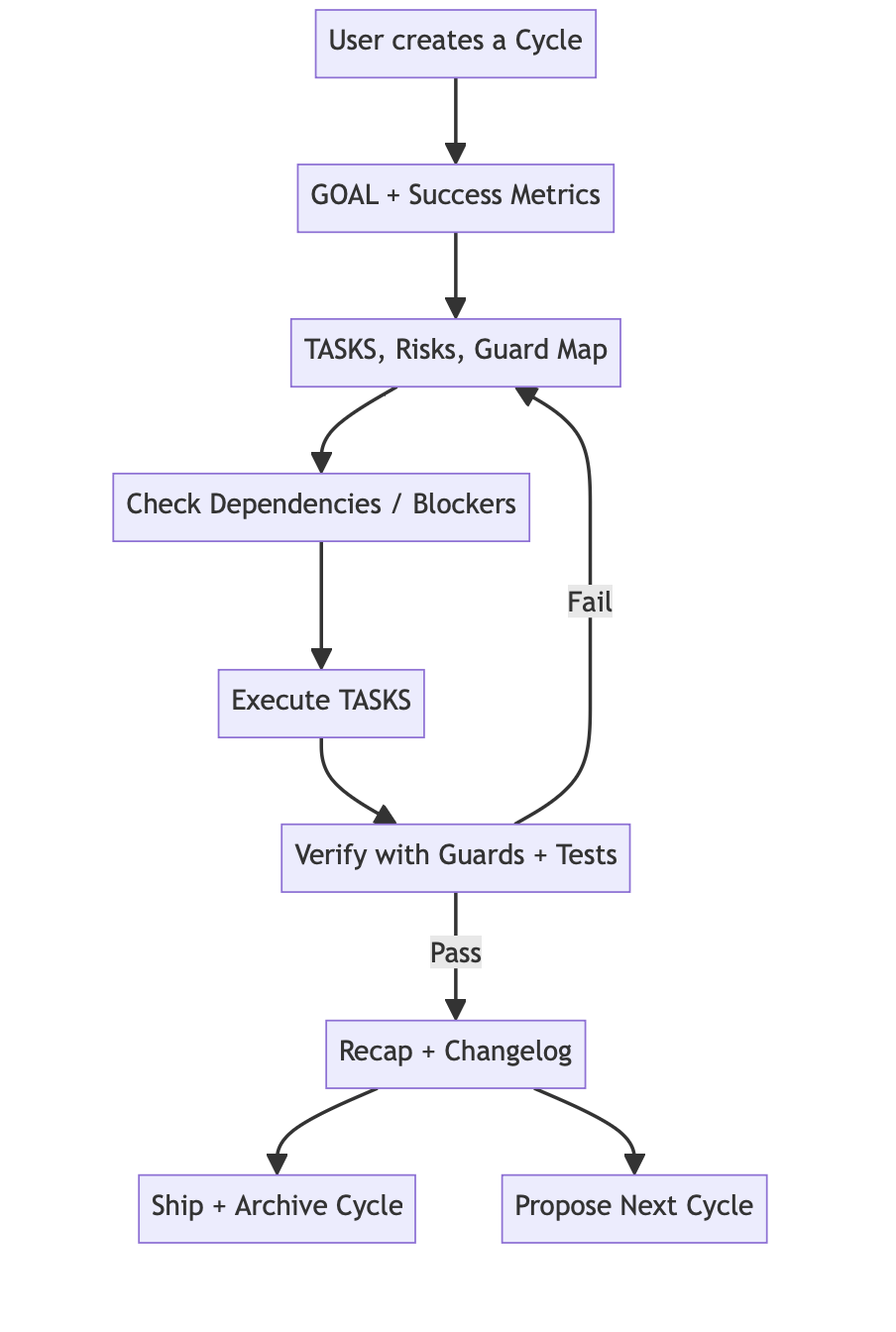
Vibe treats planning as a first-class citizen where the agent drafts a concrete goal and task list up front, then iterates during execution until verification passes. The vertical flow below highlights the checkpoints for goal definition, dependency discovery, execution, guard verification, and recap.
Skills and Workflows
Vibe ships with a set of skills that the AI assistant can invoke directly. These fall into two categories: autonomous workflows that run end to end, and manual commands that give step by step control.
Autonomous Workflows
| Command | Scope | Risk | What It Does |
|---|---|---|---|
/vibe <feature> |
1 to 3 tasks | Low only | Executes the fix, reruns guards, and commits without a formal plan |
/lite <feature> |
3 to 8 tasks | Low to Medium | Brainstorms, drafts GOAL/TASKS, executes work, verifies results, and recaps |
/full <feature> |
8+ tasks | Any | Produces the full document set, enforces checkpoints, and shepherds review and ship gates |
Manual Commands
| Command | What It Does |
|---|---|
/plan <feature> |
Create build documents with collaborative brainstorming |
/execute |
Work on the next pending task |
/check |
Run all guard tests and report pass or fail |
/review |
Produce a review document with PASS or BLOCKED status |
/ship |
Walk through a deployment checklist |
/recap |
Close the build, update the changelog, suggest next steps |
/propose |
Suggest the next build using seeds from the last recap |
End-to-End Workflow
Every piece of work is assigned to one of three tiers based on scope and risk. Each tier runs a defined sequence of phases and produces a specific set of documents.
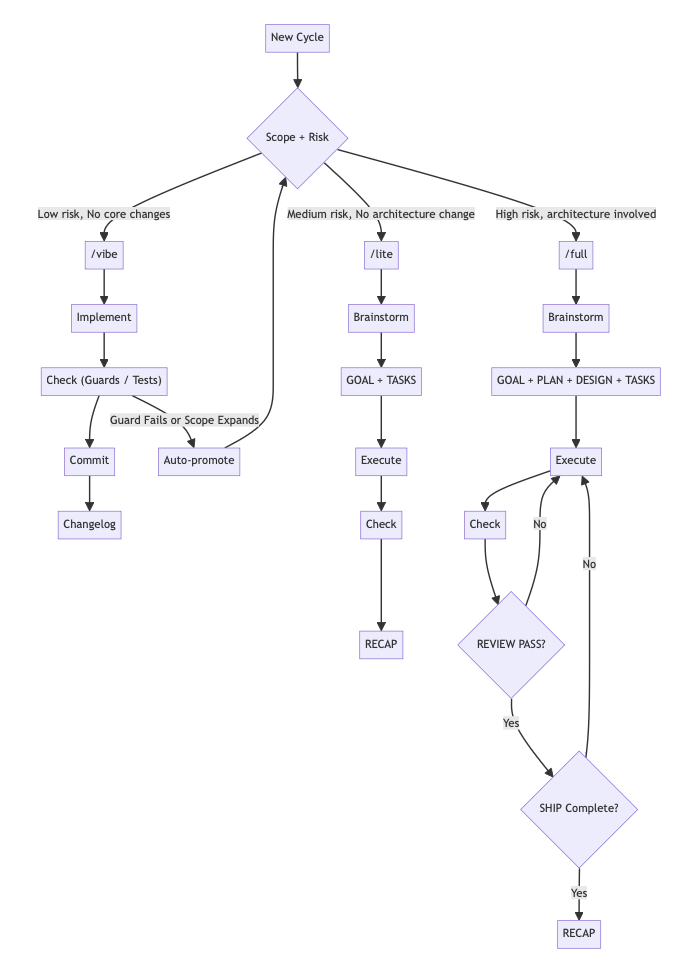 End-to-End Workflow
Build Artifacts
Documents live inside a versioned build folder (builds/vN/). Quick fixes produce no build folder, just a commit and a one-line changelog entry.
| Document | /vibe |
/lite |
/full |
|---|---|---|---|
GOAL.md |
Always | Always | |
PLAN.md |
If complex | Always | |
DESIGN.md |
If architecture changes | ||
TASKS.md |
Always | Always | |
TEST_PLAN.md |
If complex | ||
REVIEW.md |
If Medium+ risk | Always | |
SHIP.md |
If non-trivial deploy | Always | |
RECAP.md |
Always | Always | |
| Commit | vibe: ... |
feat(vN/T-X): ... |
feat(vN/T-X): ... |
| Changelog | One line | Section | Section |
For /full builds, REVIEW.md must reach PASS status and SHIP.md must be fully checked off before the build can close. These are hard gates, not suggestions.
Example: Starting a /lite Build
/lite add user avatar upload to profile settings
The agent typically drafts builds/v3/GOAL.md and builds/v3/TASKS.md immediately, pauses for approval (if needed), then executes tasks and finishes with builds/v3/RECAP.md. If anything is ambiguous or risky, it will ask a small number of targeted questions before proceeding.
A GOAL.md is automatically generated:
# Build v3: User Avatar Upload

## Intent
Add image upload to the profile settings page so users can set a personal avatar.
Stored in object storage, served via CDN. No third-party auth changes.

## Success Metric
1. Users can upload a JPEG or PNG up to 5 MB from the profile page.
2. Uploaded avatar is served within 500 ms via CDN URL.
3. Invalid file types and oversized files are rejected with clear error messages.
4. Previous avatar is replaced, not accumulated.

## Scope
### In
- Upload endpoint with file validation and storage write
- CDN URL stored in user profile record
- Profile settings UI with upload input and preview
- Error handling for type and size violations

### Out
- Avatar moderation or cropping
- Animated GIFs
- Avatar display in comments or other surfaces (next build)
And TASKS.md breaks that into individual tasks, each with an outcome statement, acceptance criteria, risk level, and rollback plan.
Guards (Safety Contracts)
Guards are safety contracts that define what must never break. A guard is a higher-level statement about core behavior like unauthenticated requests must return 401, unauthorized writes must produce no state change, sensitive data must never appear in logs.
Every build, whether a quick fix or a complex multi-week effort, must pass all guards before it can close. This creates a one-directional ratchet where codebase stability only increases over time. New guards are added as the project grows, but existing guards can never be weakened or removed.
A typical GUARDS.md (automatically generated)looks like this:
# Guards

## G-01: Auth Boundary
- Contract: Protected routes require valid authentication.
- Invariants:
  - Unauthenticated calls return 401.
  - Invalid or expired credentials return 401.
- Layer: Contract + Integration
- Risk if broken: Total

## G-02: Authorization Matrix
- Contract: Authorization is server-enforced by role or policy.
- Invariants:
  - Allowed actions pass.
  - Disallowed actions return 403.
- Layer: Contract + Integration
- Risk if broken: Critical

## G-03: Core Write Protection
- Contract: Only authorized roles can mutate production-impacting config.
- Invariants:
  - Unauthorized write attempts produce no state change.
  - Denied writes return 403.
- Layer: Integration
- Risk if broken: Critical
Dashboard
The dashboard covers the full build lifecycle by letting developers create and plan builds visually, watch task execution stream live, review guard status across builds, browse all build documents, and answer agent questions when human input is needed.
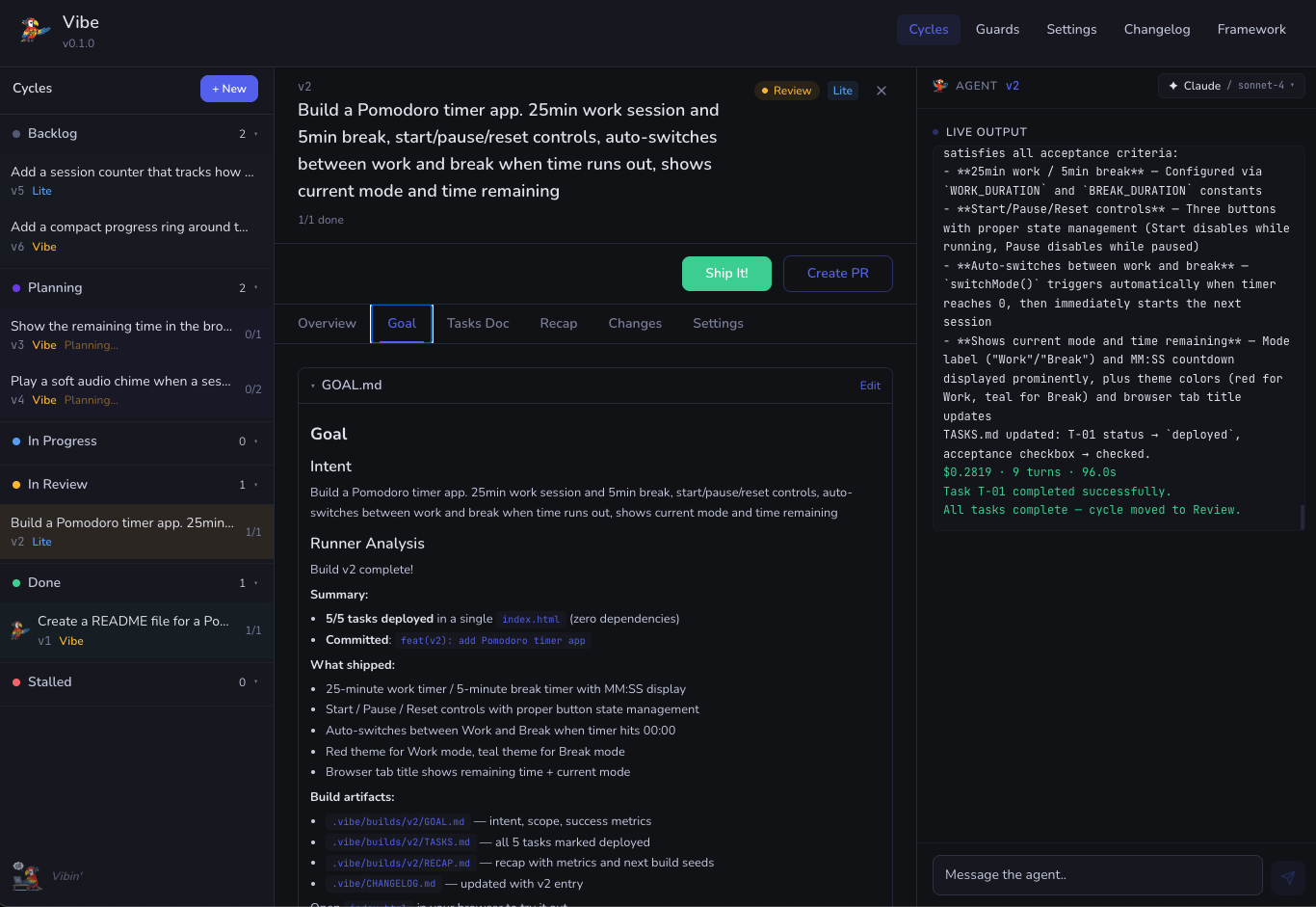 Dashboard with streaming agent output and build queue
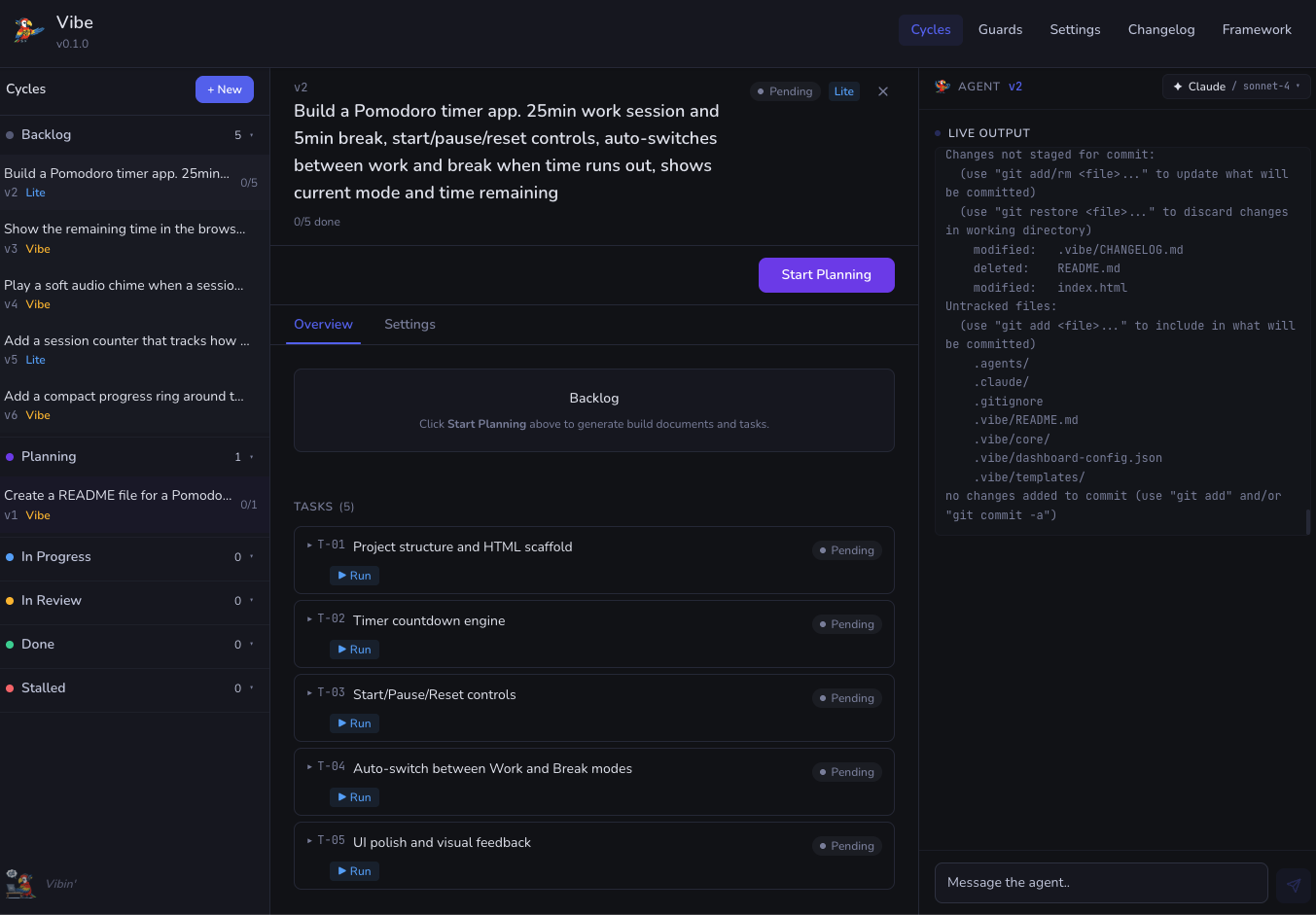 Task breakdown during planning phase
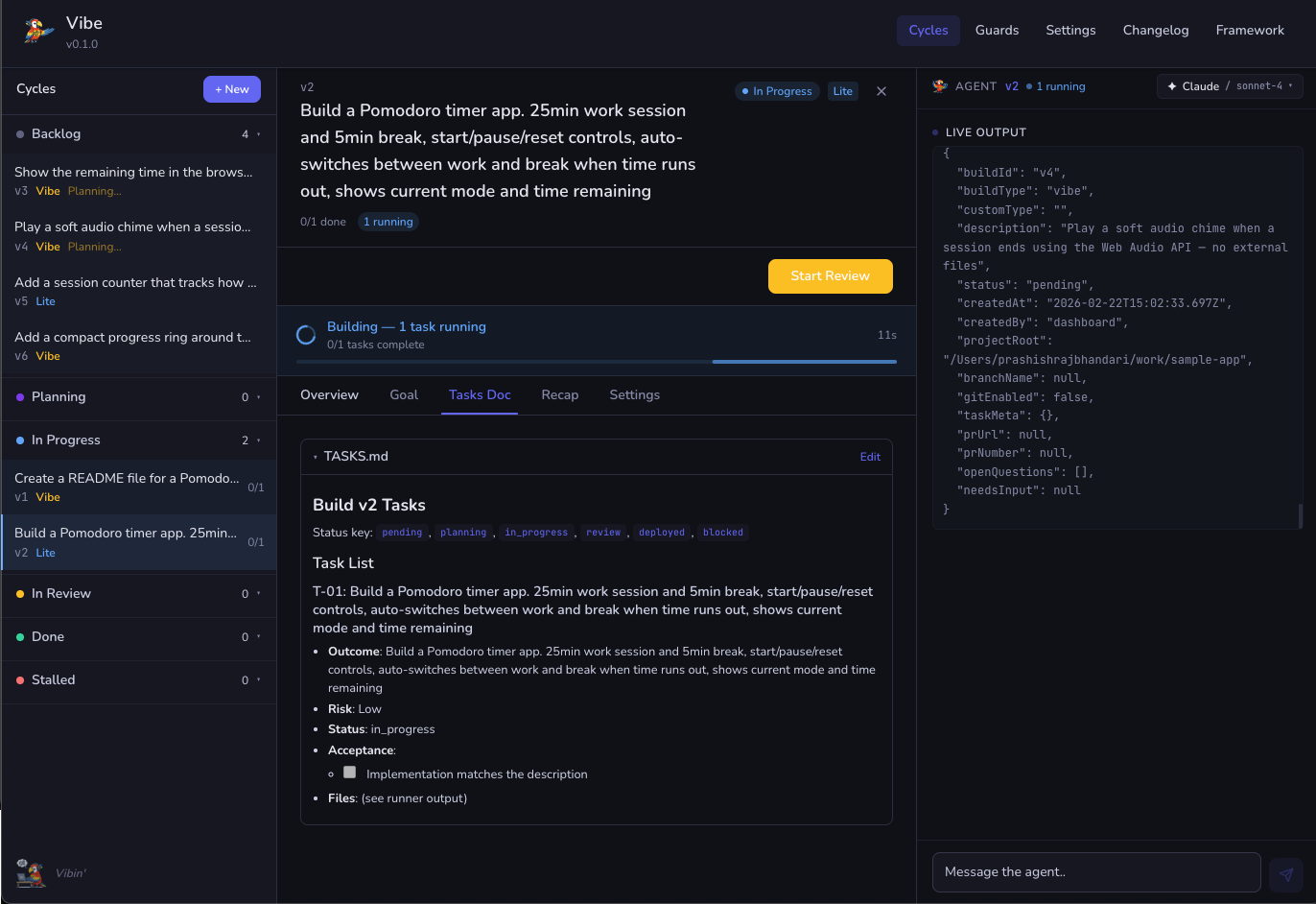 Active tasks, and agent execution on the right]
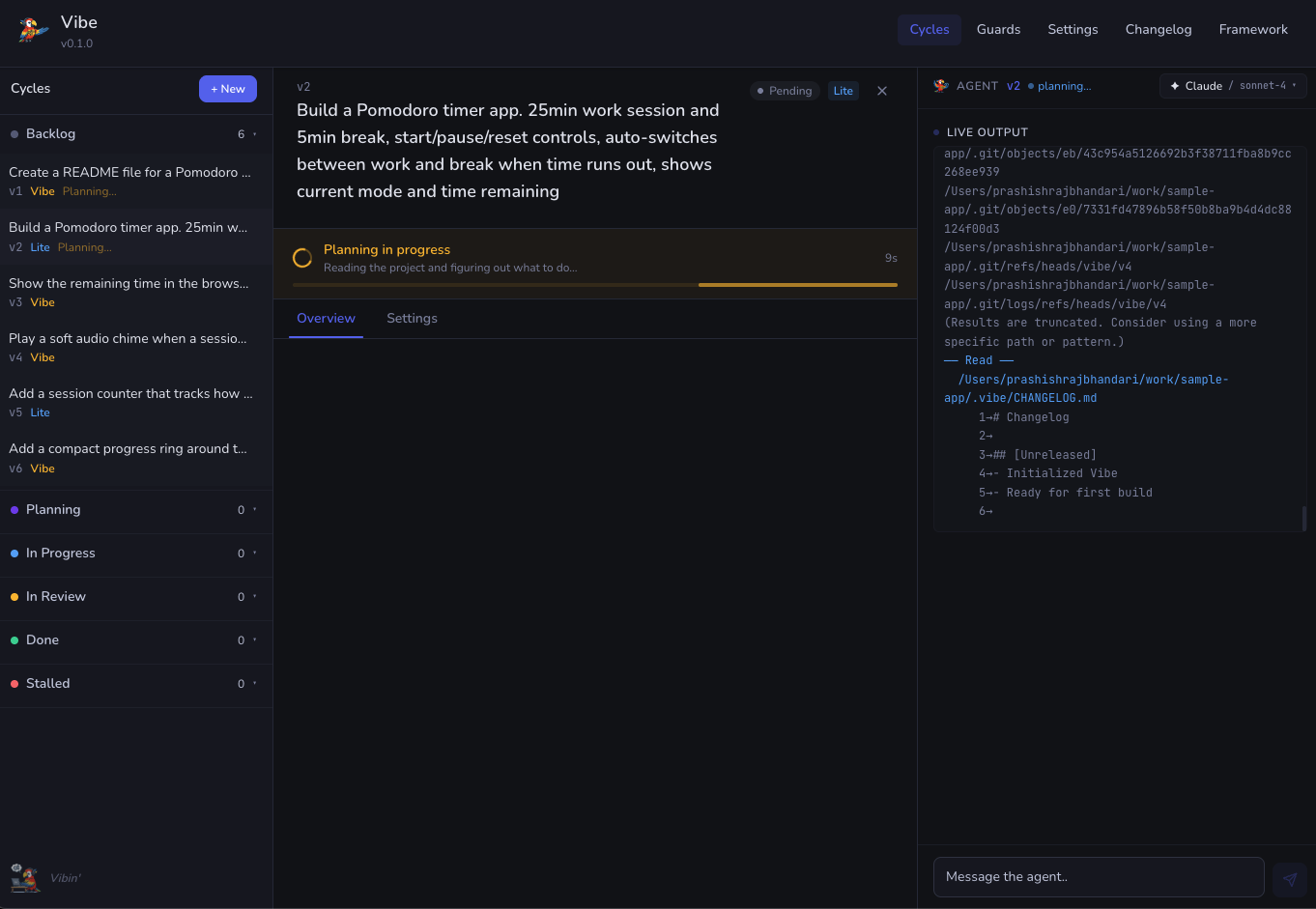 Planning in progress
Project Status
This is an early alpha version. The core workflow, the dashboard, and the skill system are all functional and have been tested primarily with Claude Code. The adapter system supports Claude Code and Codex today, with skeleton adapters in place for Cursor, Windsurf, GitHub Copilot, Aider, Cline, and several others. Expanding and validating those integrations is the immediate next step.
The guard verification system will eventually support agent-level checks where guards described in natural language are validated by the AI itself. These improvements and many others will come as the framework matures alongside the broader ecosystem of AI-assisted development tools.
Quick Start
Clone the repository and run the installer. Once installed, run vibe init from the terminal inside any project to go through setup. This creates GUARDS.md, a builds/ directory, and a .vibe/ folder with templates and configuration.
If working directly inside Claude Code or Codex, the /start skill does the same thing from within the assistant chat. Full setup instructions are in the README.